HTML To APK Converter
Convert HTML, CSS, and JavaScript files into a basic Android APK using a WebView-based structure – ideal for demos, testing, and simple apps
Upload HTML File
HTML Code
App Configuration
This tool generates:
- Complete APK project structure
- Android manifest configuration
- WebView wrapper code
- Build instructions
To build the actual APK, you'll need to use Android Studio or online APK builder services like AppsGeyser, Appyet, or MIT App Inventor.
Live Preview
Turning a web project into an Android app doesn’t always require complex development tools. With the HTML to APK Converter, you can package your HTML, CSS, and JavaScript into an installable Android APK file quickly and efficiently. This tool is designed for simple web apps, static websites, and hybrid projects that need a basic Android wrapper.
Whether you’re working with a single HTML file or a small web project, the converter helps you generate an APK that runs inside a WebView environment. It’s a practical solution for testing, demos, learning purposes, or sharing web-based apps on Android devices without writing native code.
The entire process is streamlined to keep things simple. Upload your HTML files, configure basic app settings, and generate an APK file ready to install on Android devices.

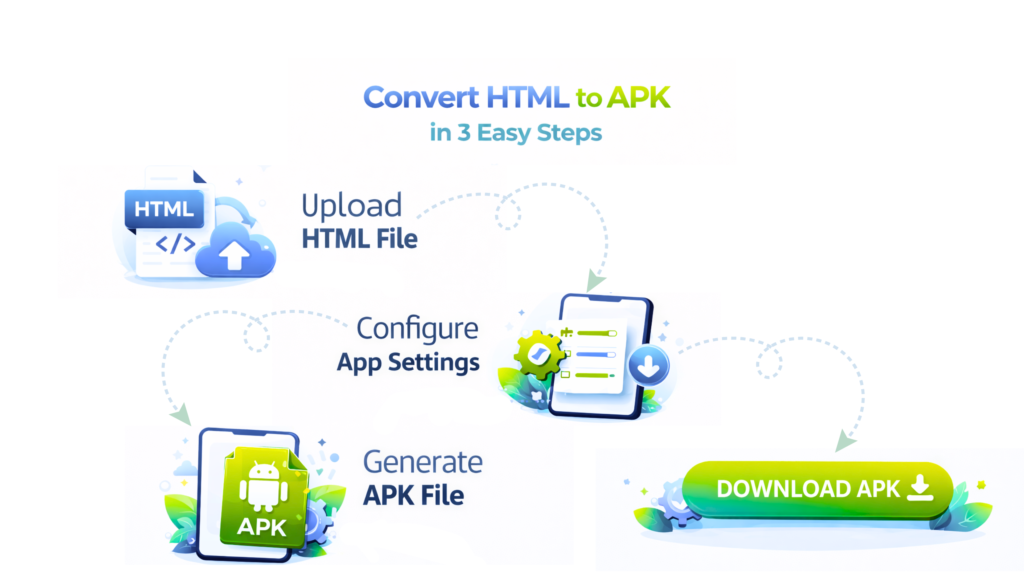
Converting a web project into an Android application can feel complicated, especially if you don’t want to dive into native app development. The HTML to APK Converter is built to simplify that process by allowing you to package HTML, CSS, and JavaScript files into an installable Android APK. It’s a practical solution for developers, learners, and businesses who want to turn web-based content into a basic Android app without writing Java or Kotlin code.
This tool works best for static websites, lightweight web apps, demos, and prototypes that need to run inside an Android WebView. Instead of rebuilding your project from scratch, you can reuse your existing HTML files and quickly generate an APK that can be installed on Android devices for testing or internal use.
The entire process is designed to be straightforward and beginner-friendly. You upload your HTML files, configure basic app details, and generate an APK file ready to download. While it does not replace full native Android development, it offers a fast and convenient way to bring web content into the Android ecosystem.
How Does the HTML to APK Converter Work?
- Upload HTML Files
Add your main HTML file or web project containing HTML, CSS, and JavaScript. - Configure App Settings
Set basic options such as app name, orientation, start file, and version details. - WebView Packaging
The tool wraps your HTML content inside an Android WebView environment. - APK Generation
An installable APK file is created based on your project and settings. - Download & Install
Download the APK and install it on supported Android devices for testing or use.
Features – HTML to APK Converter
Web Project to Android App Wrapper
Convert HTML, CSS, and JavaScript projects into an Android APK using a WebView-based structure, without rewriting your code for Android.
No Native Android Coding Required
You don’t need to write Java or Kotlin. The tool focuses on packaging web content into an installable APK, making it accessible even for beginners.
Works with Local HTML Files
Upload local .html files or small web projects directly. There’s no requirement to host your website online before generating the APK.
Basic App Configuration Options
Customize essential app details such as app name, orientation, start page, and version to match your project needs before generating the APK.
Ideal for Demos, Testing & Learning
Perfect for prototyping, internal testing, classroom learning, or sharing simple web apps on Android devices without complex setup.
Direct APK Download
Once the build process is complete, you can download the APK file instantly and install it on supported Android devices.

Where Can You Use the HTML to APK Converter?
Web App Demos
Convert HTML projects into APKs to demonstrate web apps directly on Android devices without building a native app.
Testing in Android Environment
Test how your HTML-based project behaves inside an Android WebView before moving to full app development.
Learning Hybrid App Basics
Ideal for students and beginners who want to understand how web technologies can be packaged as Android apps.
Offline Web Content
Package local HTML files into an APK for offline use, such as documentation, catalogs, or static content.
Internal Tools & Utilities
Turn internal HTML tools or dashboards into APKs for quick access on Android devices within a team.
Prototypes & Early Concepts
Create quick prototypes from HTML layouts to validate app ideas before investing in native development.