HTML to PDF Converter
Convert HTML code or files into high-quality PDF documents instantly
Upload HTML File
HTML Code
PDF Configuration
Live Preview
Converting HTML into a PDF is quick and effortless with our online tool.
There’s no need to waste time manually formatting documents or exporting files one by one. Simply paste your HTML code or upload an HTML file, preview it instantly, and generate a high-quality PDF in seconds. Our HTML to PDF converter works entirely in your browser, delivering fast and accurate results with full layout and styling support – all in just a single click.
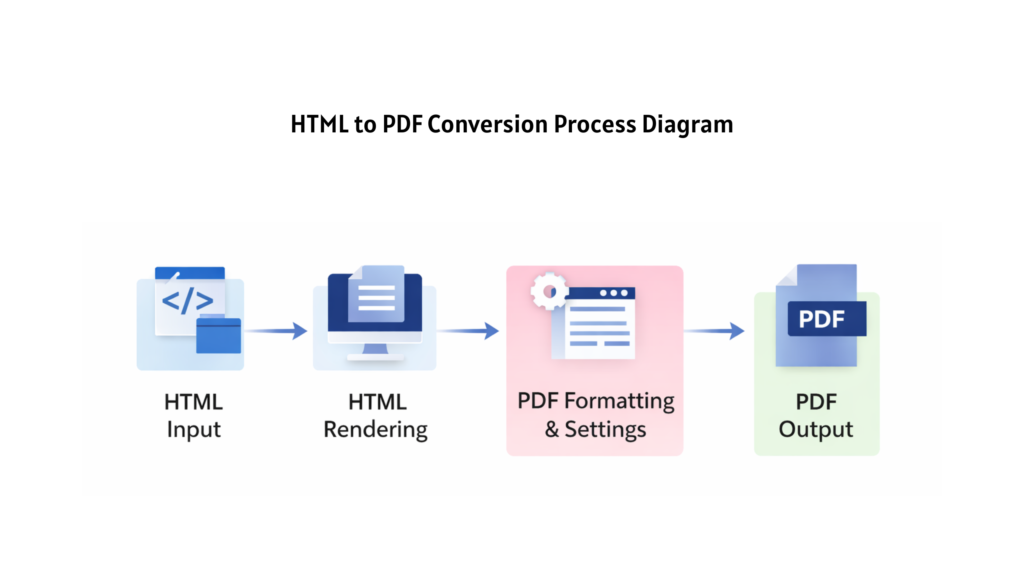
Turn HTML content into professional PDF documents in just a few clicks. Whether you are working with raw HTML code, saved HTML files, or web-based layouts, our tool helps you generate clean, print-ready PDFs effortlessly. You no longer need to rely on complex software or manual formatting — everything happens instantly inside your browser.
This HTML to PDF converter preserves your layout, styling, images, tables, and fonts, ensuring that the final PDF looks exactly like your HTML preview. It works seamlessly across different HTML structures and CSS styles, making it ideal for developers, designers, students, and professionals.
Most importantly, you can convert HTML to PDF online without worrying about compatibility or file structure. Our tool supports standard HTML files and inline code, delivering fast and accurate results every time.
How Does the HTML to PDF Converter Work?
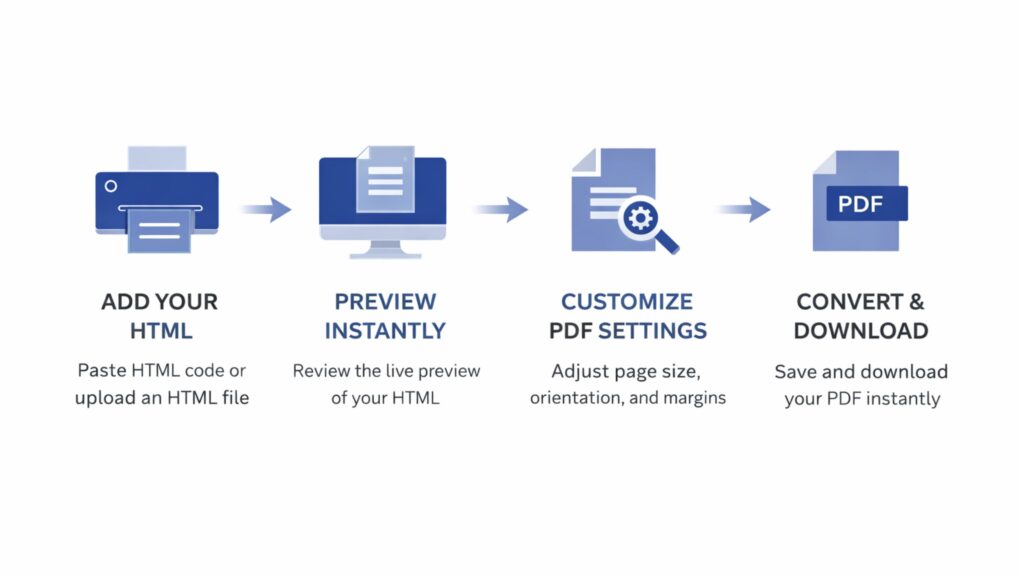
Converting HTML to a PDF is simple and requires no technical setup. Just follow these easy steps:
- Paste your HTML code into the editor or upload an HTML file from your device.
- Instantly preview the rendered HTML to review layout and styling.
- Adjust PDF settings such as page size, orientation, and margins if needed.
- Click the Convert to PDF button and download your document instantly.
Features – HTML to PDF Converter
Free to Use
Converting HTML to PDF using our tool is completely free. You don’t need to pay anything or create an account to get started. Simply paste your HTML code or upload an HTML file, convert it to PDF, and download the result instantly – no registration, no limits, and no hidden charges.
Browser-Based Conversion
Our HTML to PDF converter works entirely within your browser. There is no need to install software or rely on server-side processing. The conversion happens instantly, ensuring fast performance while keeping your data private and secure.
Accurate Layout & Style Rendering
The tool preserves your HTML structure, CSS styles, images, tables, and fonts with high accuracy. What you see in the live preview is exactly what you get in the final PDF, making it ideal for documents, reports, invoices, and web layouts.
Custom PDF Settings
You can customize your PDF output easily before downloading. Choose page size, orientation, and margins to generate a document that fits your exact requirements. This flexibility ensures professional, print-ready PDFs every time.
Instant Download
Once the conversion is complete, your PDF is available for instant download. You can save it directly to your device or share it as needed. There’s also an option to reset the editor and start a new conversion anytime.
Supports HTML Files & Code
Our tool supports both raw HTML code and standard HTML files (.html, .htm). You don’t need to worry about compatibility – just upload, preview, and convert. The tool is continuously improved to support modern HTML and CSS features.
Where Can You Use an HTML to PDF Converter?
Office & Business Use
Businesses often work with HTML-based invoices, receipts, and internal documents. With this tool, you can quickly convert those HTML files into secure, print-ready PDF documents for record keeping and official use.
Class Notes & Study Material
If your study notes or assignments are prepared in HTML format, you can convert them into PDFs for easy storage, sharing, or printing. This makes it simple to keep all your academic material organized in one format.
Web Pages & Content Archiving
Save important web content or HTML layouts as PDF files for offline access or future reference. This is especially useful for developers, writers, and researchers who want to preserve content exactly as it appears.
Forms & Templates
HTML forms and templates can be converted into PDF format for distribution, submission, or documentation purposes. This ensures consistency and compatibility across different devices and platforms.
Sharing on Digital Platforms
PDFs are widely accepted across platforms. By converting HTML to PDF, you can share documents via email, cloud storage, social media, or messaging apps without worrying about formatting differences.
Reports & Documents
You may need to share reports, proposals, or articles in a fixed and professional format. Our HTML to PDF converter helps you turn HTML-based documents into clean PDFs that are easy to share via email, WhatsApp, or other platforms without layout issues.